Insights
Insights brings together every event your school has run in a year, so you can see how your events are going over time and compare one year with the last. Where statistics describe a single event, Insights looks across all of them.
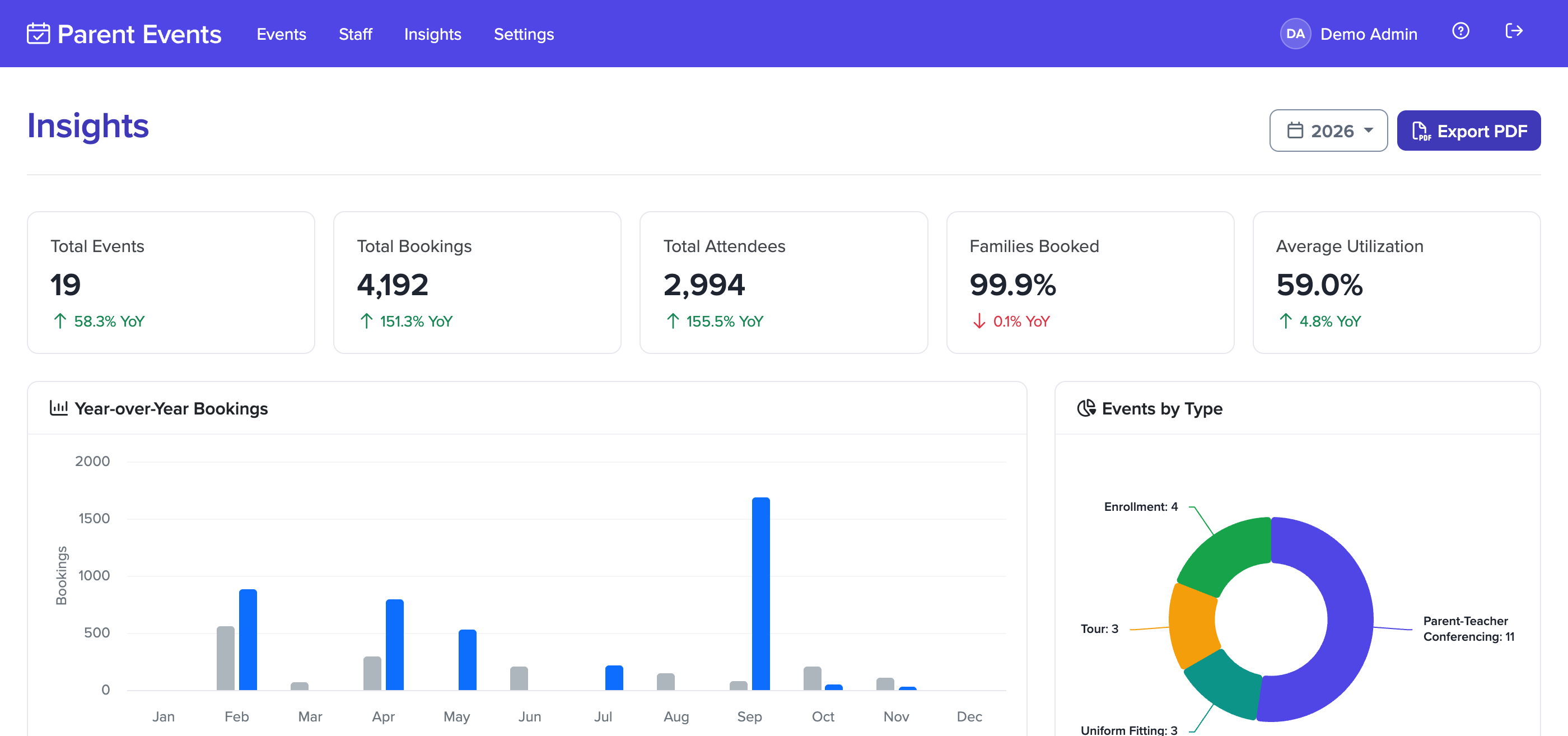
To open it, click on Insights in the main menu. Choose a year from the menu at the top of the page to look back at an earlier one.
Insights fills in once you've run your first event. Until then, the page shows a message rather than a page of zeros.
Summary
The cards at the top show the year's totals: the number of events, bookings, attendees, and the average utilization across your events. Each one is compared with the year before, as a percentage up or down.
Utilization is how full an event was: the bookings it received out of the time slots it had available. The average is taken across every event that had time slots to book that year.
Bookings and timing
- Year-over-Year Bookings shows bookings for each month next to the same month the year before.
- Events by Type breaks the year's events down into conferences, tours, uniform fittings and enrollment events.
- Booking Speed shows how quickly families booked once each event opened: in the first hour, the first day, the first three days, the first week, or later. A high share in the first day usually means families were ready and waiting, and that popular times may have gone quickly.
- Popular Booking Times shows which times of day were booked most, which helps when planning the hours of your next event.
Events
A table lists each event that year, with its date, the number of bookings, the share of registered families who made at least one booking, its utilization, and how many families gave feedback. Click an event's name to open its statistics.
Staff
Staff Utilization shows how full each staff member's timetable was across the year. The dashed lines mark 40% and 90%: staff well below 40% may have had more time than they needed, and staff above 90% may need more time next event.
Families
These charts are based on families' profiles, so a family is counted once however many events they attended.
- New vs Returning Attendees shows how many families attended an event for the first time that year, and how many had attended one in an earlier year.
- Attendee Retention shows the share of last year's families who came back this year.
- Profile Tags shows how many profiles have each of your profile tags.
Feedback
If your events have a feedback form, Insights summarizes the answers from every event that year:
- Feedback Rating Distribution shows how families answered each rating question.
- Most Skipped Feedback Questions lists the optional questions families most often leave blank, which can be a sign a question is unclear or not worth asking.
- Feedback Keywords shows the 20 words that come up most often in families' written answers.
Exporting Insights
Select Export PDF to download the selected year's Insights as a report, ready to share with your leadership team or board. It includes a sample of families' written feedback.
How up to date is it?
Insights is built from event statistics, which are collected every hour, and the page itself can take up to another hour to refresh. Figures for an event that's running now may lag behind its own statistics page by up to a couple of hours.
An event counts towards the year its statistics were collected in, so an event that runs across New Year appears in both years.